
Control plane
CommercialGoverns, off the critical path
- Console, organisations and users
- Virtual keys, teams and cost centers
- Model catalogue and policy administration
- Aggregated FinOps and alerts
- Gateway enrolment, signed configuration, revocation
Platform
TokenSaver instruments every LLM call, tool call and decision without changing your agents’ code: you see the fleet, you optimise the spend, you enforce policy before the model answers.
Architecture
TokenSaver separates what decides from what executes. The control plane sets the rules without sitting on the path of your LLM calls. The data plane, an open-source gateway, applies them on every call, wherever you choose to run it.
Governs, off the critical path
Signed configuration · revocations
Metadata · health signals
Executes, on the critical path
| SaaS | Hybrid | Self-host / air-gap | |
|---|---|---|---|
| Data plane (gateway) | TokenSaver cloud | Your infrastructure | Your infrastructure |
| Control plane (console) | TokenSaver cloud | TokenSaver cloud | Your infrastructure |
| Prompts, cache, detailed replay | TokenSaver | Your infrastructure | Your infrastructure |
| Hard limits enforced | On the TokenSaver gateway | On your edge | On your infrastructure |
| Quota limit | According to your plan | None | Capacity set by contract |
And without the console?
The open-source gateway is 100% autonomous: with no control plane, you configure it by hand, with no quota limit. An enrolled gateway also keeps running after the 30-day trial, without the console. In both cases, the free VS Code extension for Claude Code plugs natively into it, locally, Keep my Claude mode included. The console and centralised governance are what the paid plans add. The public repository is coming soon.
Observability
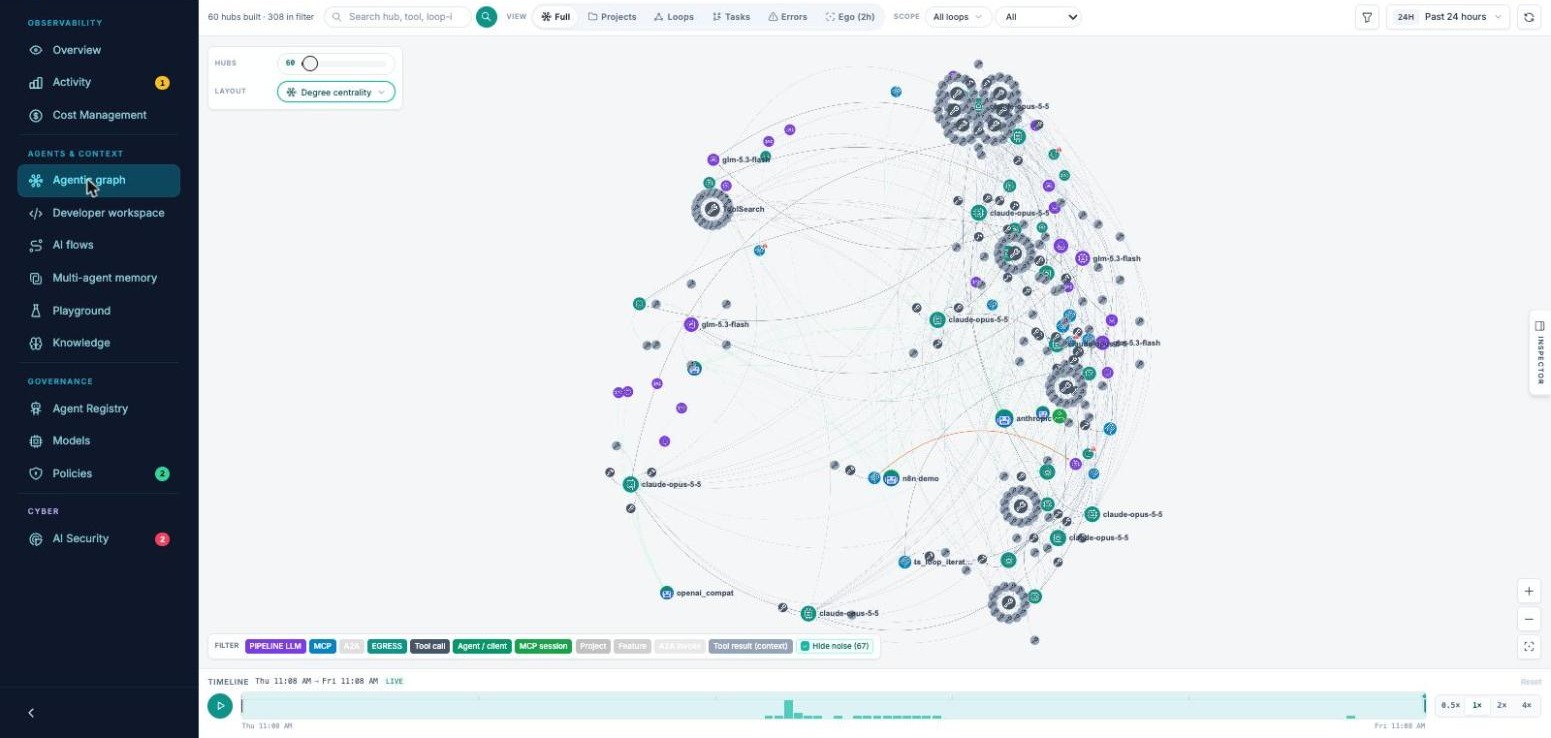
Agents, assistants, n8n workflows and API calls consolidated in one readable timeline, with the agentic graph to follow every chain of calls.
Agents, assistants, workflows and API calls in a single timeline.
Latency, cost, tokens, cache rate and guardrail failures, per agent, team or model.
Multi-agent call chains and the tools invoked at each step.
Every call logged, signed and exportable as OpenTelemetry for your audits.
Trace a behaviour back to its origin with execution context and decision lineage.
Drift, cost spikes, injections and policy breaches caught before they become incidents.
Optimisation · FinOps
Model selection, semantic cache and compression by content type, applied inside your business flows. You keep control of cost, quality and latency.
Semantic cache, smart compression and routing to the most efficient model, without touching your agents’ code.
Automatic failover to the fastest endpoints, optimised streaming and configurable quality thresholds.
Budgets per project, overrun alerts, per-team cost allocation and traceability of every euro spent.
Varies by workload, measured per run. Reversible compression (CCR) lets the agent fetch the original on demand.
Cyber & Zero Trust
Nothing is allowed by default. Every action is identified, governed by policy and traced. Your teams move faster with AI; your organisation keeps control.
Personal data, secrets and confidential information injected into prompts or returned by models.
Injection attempts that push an agent outside its business scope or trigger unplanned actions.
Agents with too much autonomy calling sensitive tools without validation.
Unapproved models, connectors or integrations used outside the catalogue.
No clear view of who did what, with which agent, on which data, at what cost.
Every AI call is authenticated and tied to an identity: user, application key or agent.
Unapproved models, tools and connectors are refused. Only your approved catalogue flows.
Rules defined in the platform, per organisation, workspace or key, not in each client app.
Allowed tools, bounded autonomy and human approval when needed.
Every decision, allowed, blocked or pending, leaves a trace for the SOC and the CISO.
Configure once, apply everywhere: chat, API, agents, MCP.
Integrations
OpenAI and Anthropic compatible APIs, Python SDK, MCP tools or the open-source CLI: every entry point leads to the same control plane.
Vibe coding at scale · Open-source VS Code & Cursor extension
Every developer can launch agents in one sentence. The TokenSaver extension for VS Code and Cursor augments Claude Code with tracking and control of the code it generates: what agents really did, which files they wrote, what it cost and what was left broken. That is how vibe coding scales across the company.
Monitors built on local Claude logs tell you what a session cost, after the fact. TokenSaver is on the path of the request, so it can act on it and leave a trace your team can open.
Observe
Prompts, file writes, tool calls and cost, captured session by session and joined to the same runs as the console.
Intervene
Serve from cache, mask PII and compress tool output before the model. In routed mode, also refuse a model your Agent Registry has not approved.
Prove
“Explain this file” traces the chain from prompt to tool call to file version. Share the session link with your lead or security team.
Keep my Claude
DefaultKeep your Claude plan. No extra LLM bill.
Route with TokenSaver
GovernedRoute through TokenSaver to govern models and policies.
Free and open source · coming soon to the VS Code Marketplace · no CLI or pip install required · macOS and Linux · prompt content capture is opt-in. The ✓ badge means a file was captured and policy-checked; it is not a compliance certificate.
Claude Code, augmented in VS Code or Cursor · 3 steps
Install the open-source TokenSaver extension, soon on the VS Code Marketplace: it adds a TokenSaver panel to the activity bar. No CLI to set up.
Connect your account. Keys stay in VS Code secret storage.
Start a mode “Keep my Claude” keeps your Claude plan; “Route with TokenSaver” adds virtual keys, model choice and quotas.
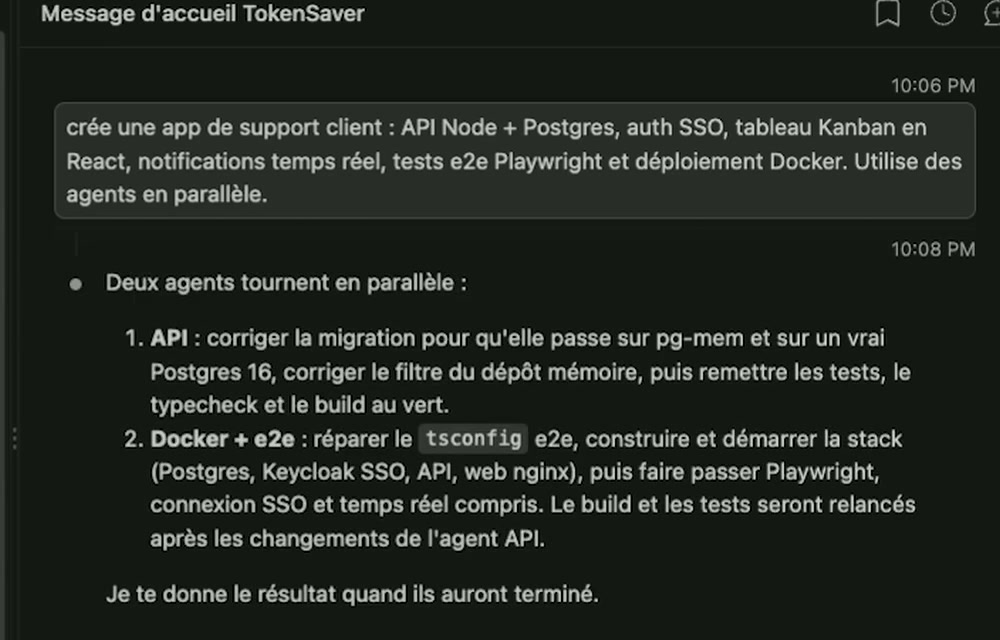
Developers keep coding in VS Code with Claude Code, nothing changes in their workflow. The extension captures every prompt, file write, tool call and dollar in the background, even on their own Claude plan, with no extra LLM bill.
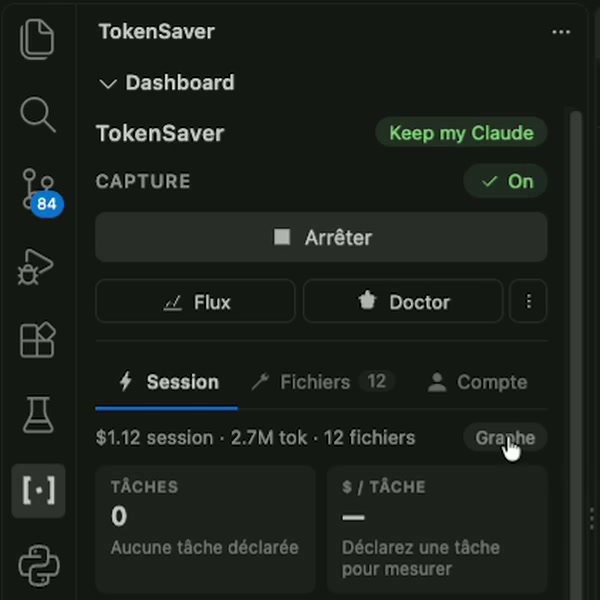
The TokenSaver panel shows session cost, $ per task, savings and the files the AI wrote, with loops, failures and retries in the status bar. “Explain this file” gives the provenance of any file. One click on a KPI opens the agentic graph.
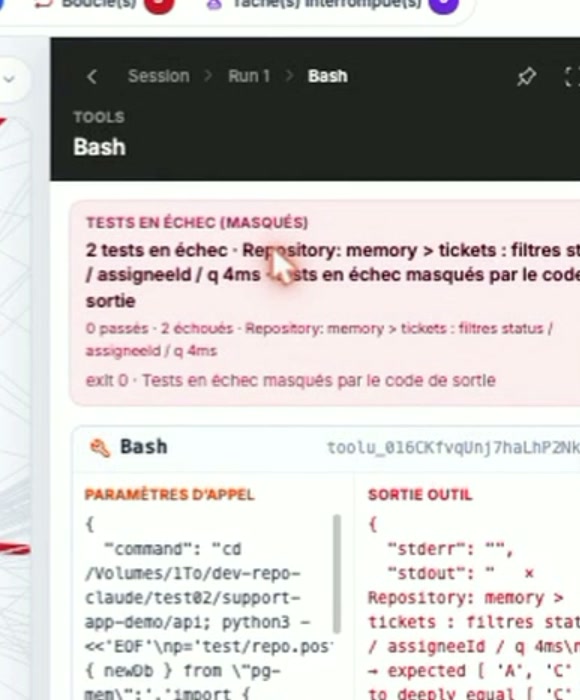
In our demo, the report was all green. The graph showed 12 failed tools and 2 red tests hidden behind an exit code 0. Errors, retries and their cost, traced call by call.
From one developer to every team
No. It brings the missing AI layer (identity, policies, agent control and traceability) and exports its signals to your SIEM.
No. TokenSaver plugs into existing flows: chat, LLM-compatible APIs, agents, MCP connectors.
Your administrators and security teams, through centralised policies at organisation, workspace or key level.
Least privilege: allowed tools, bounded autonomy, human approval steps when needed, and full traces of every decision.
Let us connect your existing flows in a few minutes.